Version 0.2.4 · macOS 14.6+ · Apple silicon · 7.5 MB · No account required · Windows soon
Made for the space around your work.
01Try it
Your notch, live.
This is the notch's own interface, redrawn to run on this page. The clock ticks, the timer counts down and the list takes your tasks. Watch the tour, or pick any moment yourself.
FinderFileEditViewGo
Morning light on the window glass
Working
24:12
Claude Code is waiting…In my-app · answer to continue
Claude CodeBash
landing-page needs permission
npm run build
Claude CodeMax
Updated just now
Session30% left
Reset 3h 0m
Weekly60% left
Reset 1d 6h
Runs out in 30m
Claude Code finisheddock-app
ChargingCharger connected
70%
AirPods ProLeft 72% · Right 68%
70%
Pixel 9PIN 4821
Pixel 9 wants to share
2 files · 5.5 MB
53%
Daybreak
The Sample Band · Day One
0:123:51
PomodoroFocus
0
25:00
Ready
Today
09:30Stand-up
14:00Design review
17:30Walk
To-do 0
Add your next task. Tasks stay on this Mac.
All 1Server 1
Storefront
localhost:3000
Next.js · /Users/me/Projects/web
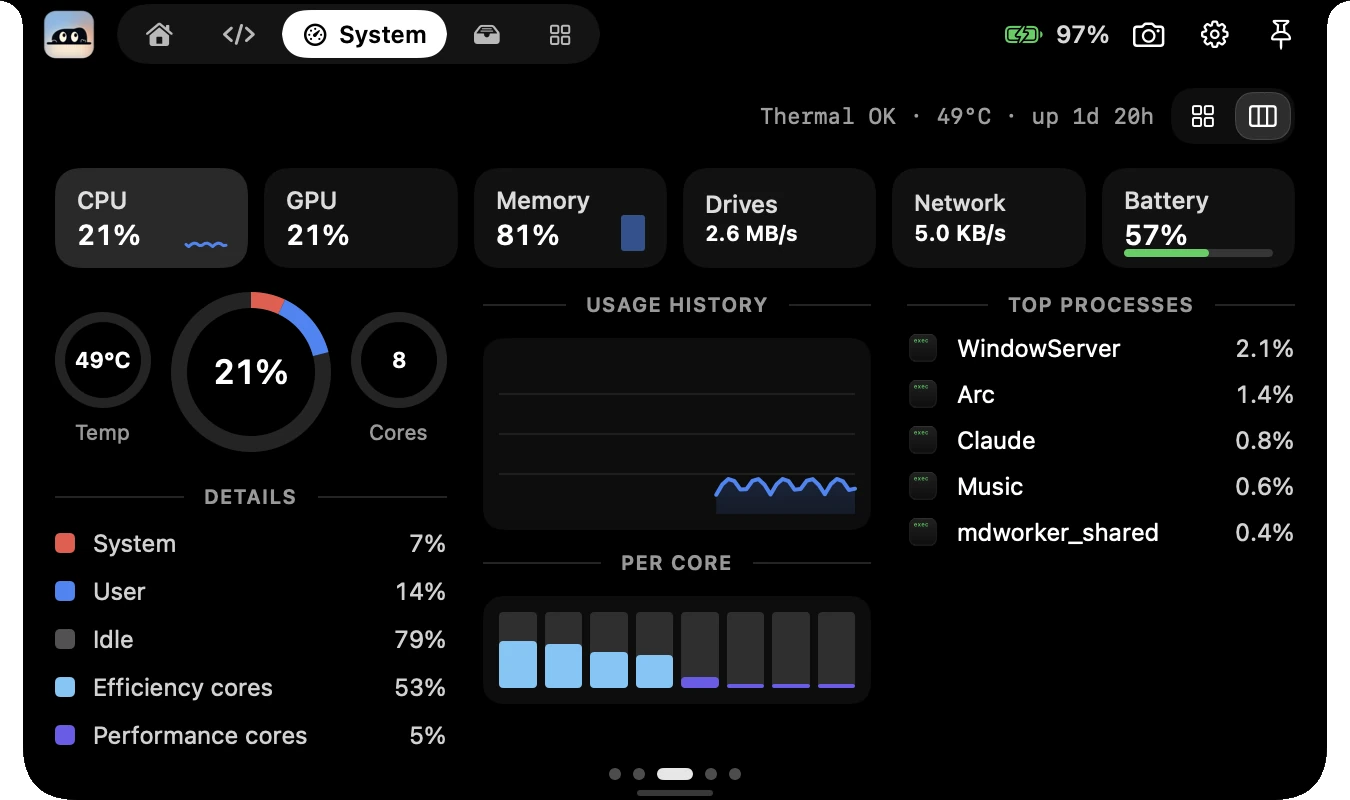
CPU
21%
GPU
21%
Memory
81%
Drives
2.6 MB/s
Network
5.0 KB/s
Battery
57%
OKThermal21%8Cores
Details
System7%
User14%
Idle79%
Efficiency cores53%
Performance cores5%
Usage history
Per core
Top processes
WindowServer2.1%
Browser1.4%
Editor0.8%
Music0.6%
mdworker_shared0.4%
Drop files to keep them handy
The shelf keeps references, never moves or copies your files.
AirDrop
Drop to send
1
Keep going
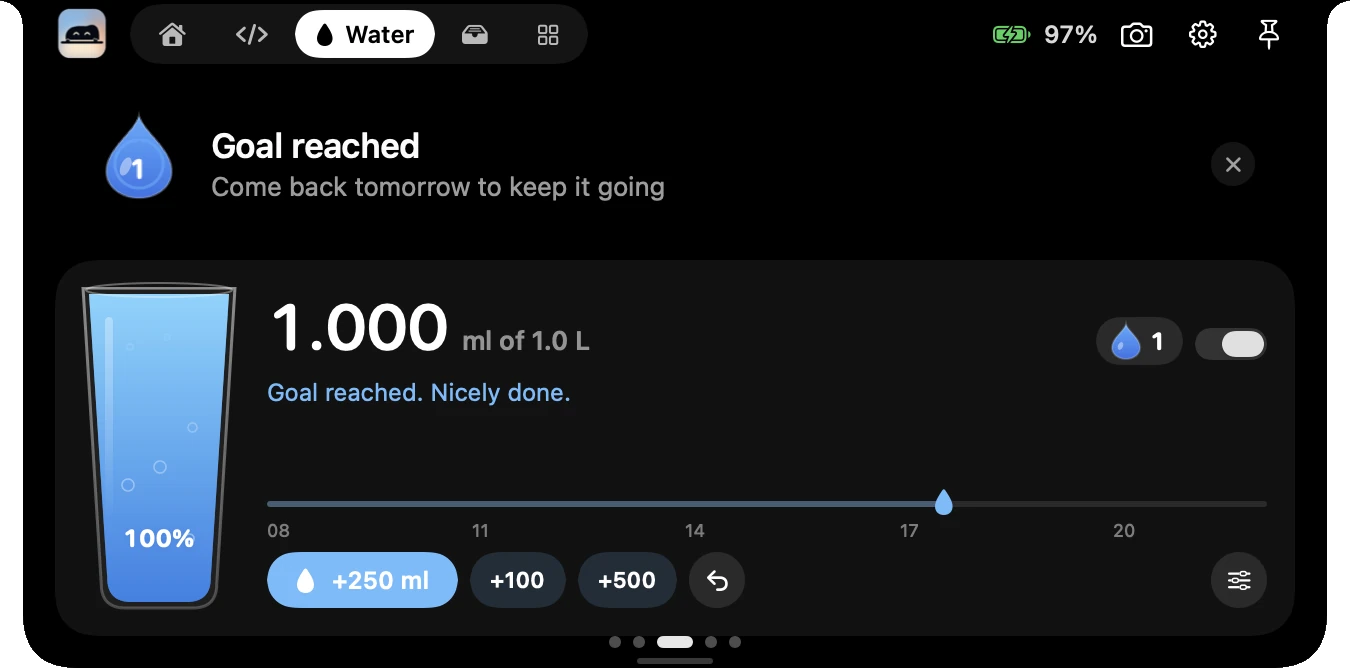
Add a glass when you drink
750 ml of 2.0 L
Add a glass to get going.
Hover or tap the notch
Closed, the notch shows the line being sung and the app's equalizer. Any app's Now Playing works; lyrics come from LRCLIB when you switch them on.
Or pick a moment
ClosedOne thing at a time, camera-sized
When it needs youSmall pop-ups that arrive on their own
OpenA small desk under the notch
Drawn on this page from the app's design, not recorded. Names, numbers and levels are samples; only the clock, the timer and what you type are live. Glass is left out: it bends what is behind it, so a flat drawing would misrepresent it.
02With agents
Know how much of your plan is left.
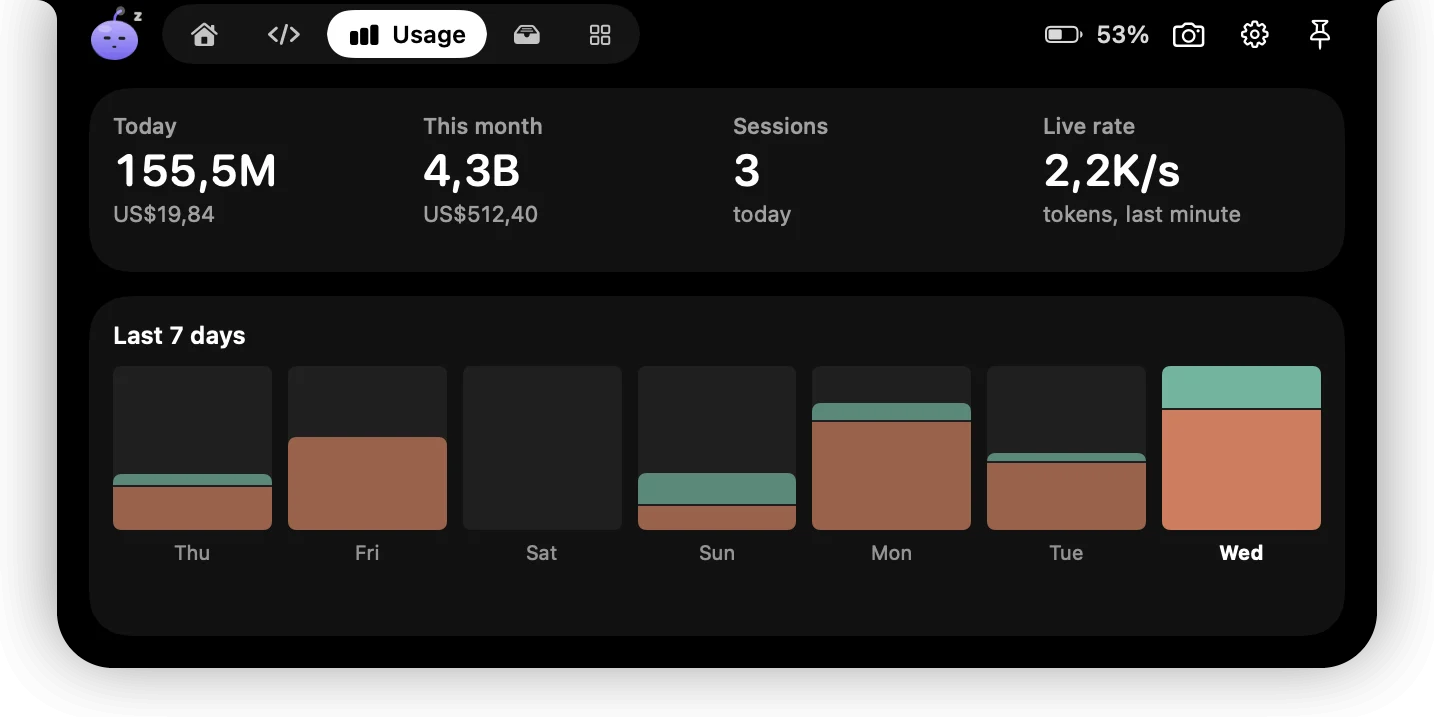
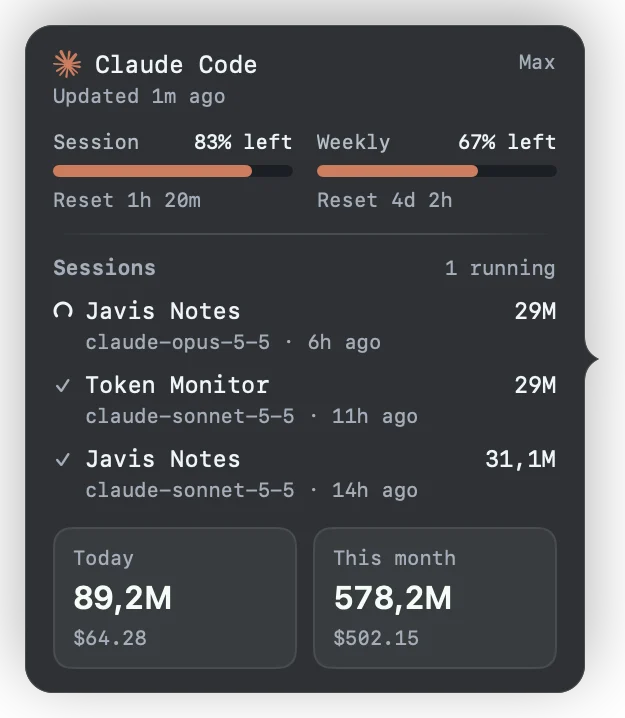
Amaru reads the session logs your coding tools already write on this Mac and adds them up by day, month and model. For Claude Code, Codex, OpenCode Go, Cursor, GitHub Copilot, Kiro and Antigravity it can also show your plan limits and when they reset, with each account's email partly hidden.
Claude Code limits
Codex limits
OpenCode Go limits
Cursor limits
GitHub Copilot limits
Kiro limits
Antigravity limits
OpenCode
Gemini CLI
Qwen Code
Hermes Agent
Kiro, Cursor, GitHub Copilot and Antigravity keep no token counts on your Mac, so Amaru shows their plan instead, using each tool's own sign-in. A second Claude login can be added by hand.
Try the forecast
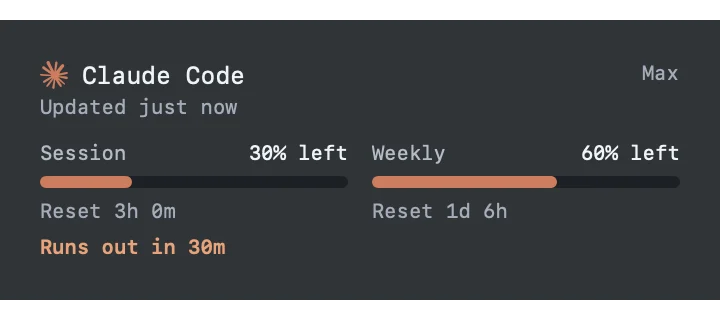
Amaru draws a straight line through your recent readings and says when a window runs dry. Set how much you have used and how fast, and see what it would say.
Drawn on this page with the app's own rule. The numbers are yours to make up; they are not anyone's real usage.
Claude CodeExample
Session30% left
Reset 3h 0mRuns out in 1h 30m
Weekly30% left
Reset 1d 6h
Today, this month, live rateEstimated cost from public model prices, in USD or IDR. Tools without a price show tokens only.Per tool, per sessionLimits left, reset times and each running session with its model.When it runs outA forecast from your recent pace, and a banner two hours before.
Read on your Mac
Token counts come from local log and database files, opened read-only. Nothing about your prompts leaves the Mac.
Limits are opt-in
Plan limits ask the tool's own service (Anthropic, OpenAI, OpenCode, Cursor, GitHub) with the sign-in the tool already stored, or its local server for Antigravity. Only those hosts, over HTTPS. Amaru never refreshes another tool's token.
Shown with sample data
Screens on this page are rendered from the app with example numbers, not someone's real usage.
03Around it
More than a notch.
Two optional extras sit around it: a dock that shows an app's windows, and a companion that lives beside the camera.
A dock that shows the windows
Window previews on hover. See every window of an app before you click, then focus or close the one you want.
Clock, battery and timer in the bar. Glass on macOS 26, solid when Reduce Transparency is on.
Can stand in for the macOS Dock. Optional and marked Experimental in Settings. The system Dock comes back when you turn it off or quit.
Someone lives in the notch
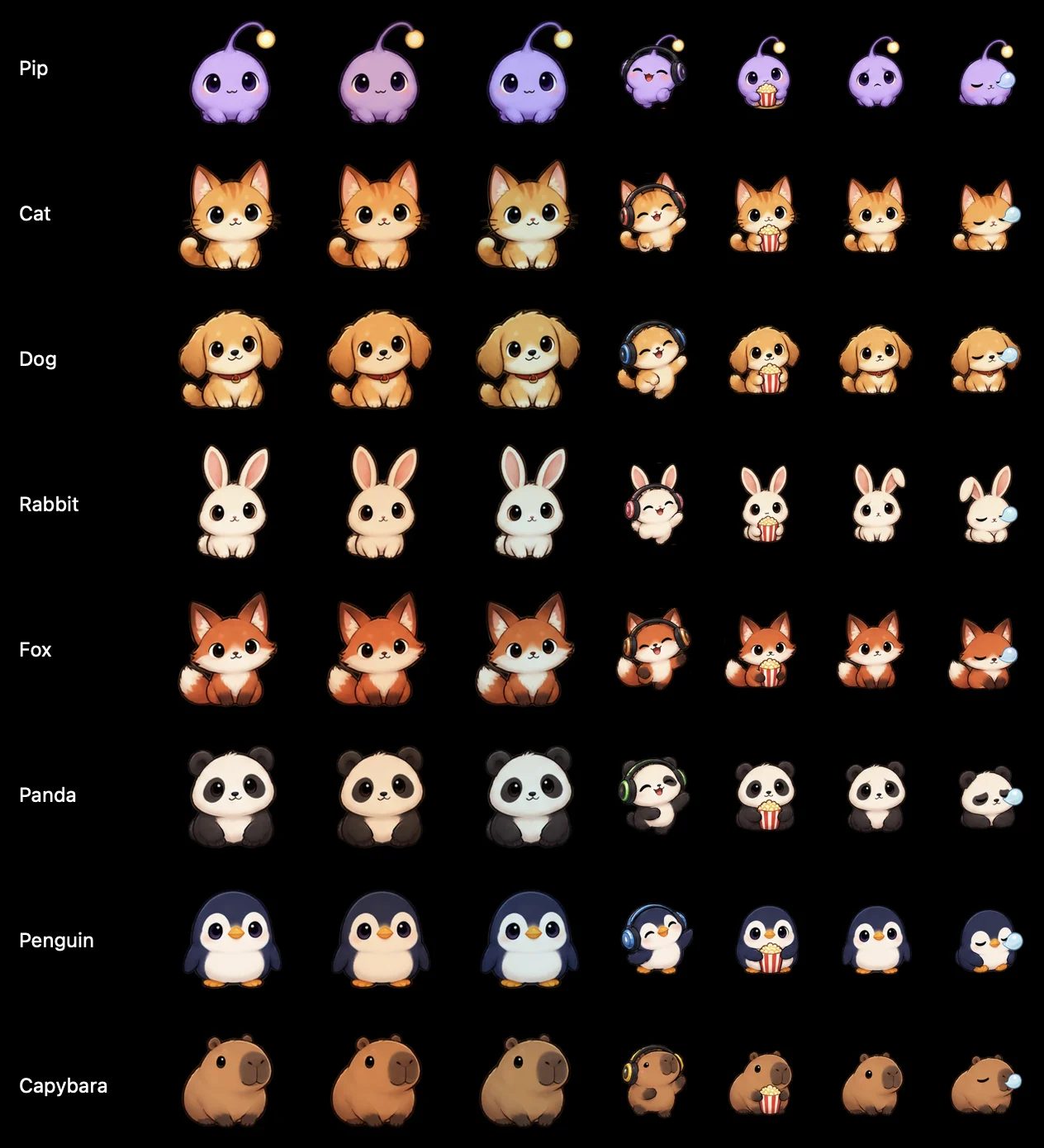
Pip and seven other pets sit beside the camera. They put on headphones when music plays, watch when a film is on, focus with your timer and fall asleep when you step away. Three drawing styles, or your own image. Prefer something quieter? Let Peek's eyes blink beside the camera instead.
In planning
Windows is next.
Amaru for Windows will be its own native app, not a port of the Mac one. There is no build to download yet and no date to promise. Progress will show up in the changelog first.
Hover to see an app's windows, built on Windows' own APIs.
Planned
An island instead of a notch
Windows PCs have no notch, so the top-edge surface is being redesigned rather than copied.
Planned
The same usage numbers
Usage and limit rules checked against shared sample files, so both apps agree.
04Trust
Stays on this Mac.
No account required
Nothing to sign up for to use Amaru. An account is only for the optional Amaru Plus add-ons, which are not on sale yet; signing in sends your identity, and a license key once if you add one. Settings, notes, to-dos and the shelf live in your user folder.
Permissions only when used
Calendar, camera, Bluetooth, Screen Recording and Accessibility are asked for when you turn on the feature that needs them.
Network only if you switch it on
Lyrics send the song's title, artist, album and length to LRCLIB. Plan limits talk to Anthropic, OpenAI, OpenCode, Cursor and GitHub, only for the tools you use. All of these are off until you enable them.
Claude Code answers stay local
The optional permission hook talks to Amaru through private files in your user folder. If Amaru is not listening, the hook exits and Claude Code asks as usual.
Local browser bridge
The optional Chromium extension pairs with a key and talks to Amaru on 127.0.0.1 only.
Version 0.2.4, a zip you can check against its SHA-256
To use it
No account required
Only the optional Plus add-ons ask for one
macOS 14.6+
Apple silicon
No Intel build yet
Not source
A build
Closed source, shared as the ready-made app
Updated 1 Nov 2026
Just landed.
What changed most recently, straight from the changelog. Read all of it.
Accounts, Cursor, Antigravity and a friendlier start
AI usage limits are one card per account, with the email partly hidden. A second Claude login can be added by hand in Services.
Cursor plan limits, read from Cursor's own sign-in. Antigravity's plan and its Gemini and Claude windows show with the account's email, and running Kiro and Antigravity tasks appear in the notch.
One Send tile on the shelf for AirDrop and nearby Android phones, and a QR code that lets any phone send files to your Mac through a web page, with no app.
Answer Claude Code from the notch
Optional: Claude Code permission prompts arrive in the notch as Deny, Always or Allow.
You install the hook yourself. If Amaru is closed or you do not answer, Claude Code asks as usual.
Themes, pop-ups and island settings
Five notch themes: Classic, Peek, Peek Light, Glass and Pill. Peek's eyes can be the idle look.
Pop-ups with a level ring and a big number for the charger and Bluetooth devices, plus a Pop-ups page in Settings.
Choose how fast the notch opens (Quick, Normal, Slow) and how soon it closes, and set its width.
System, your way
Tabs for Overview, Processes and Hardware, or the Classic layout with everything at once. Battery health, cycles and temperatures show where the Mac reports them, and only while the page is open.
Focus and water, with memory
Ninety days of focus sessions, break suggestions and an optional water streak. Reminders wait while you are locked or idle.
One panel for your AI tools
Services shows what Amaru reads from each tool and how to cut it off. Sign in opens the tool's own login in Terminal. OpenCode Go limits are in, and costs can be estimated in USD or IDR.
Antigravity and more Claude accounts
Antigravity limits are back, with each window labeled. Add up to four extra Claude accounts; their keys stay in Amaru's own Keychain item.
Shelf, tidied
Drop files, copy them as context for an agent, or receive from a phone with a QR code. Taking a file off the shelf never deletes the original.
05Get it
Come say hi.
Amaru is a ready-to-run Mac app: download it, open it, and choose what to switch on. Windows is on its way.
Version 0.2.4 · Apple silicon · 7.5 MB · macOS 14.6 or later
Unzip and drag Amaru into Applications.
Open it once. This build is not notarized yet, so macOS may block it. If so, choose Open Anyway in System Settings › Privacy & Security (steps below).
Pick what you want. Nothing is on until you say so, and nothing needs an account.
Check the download
The file's SHA-256 is 3a115029e22e3ed7baf267505a3c1ed523a35c38541b20d0f515b4ed8615146f. In Terminal:
shasum -a 256 ~/Downloads/Amaru-0.2.4-arm64.zip
Opening it the first time
Amaru is not notarized by Apple yet, so macOS may stop it once. That is expected, and it takes a minute.
Drag it into Applications
Open the zip in Downloads and move Amaru into your Applications folder.
If it is blocked, choose Open Anyway
Open System Settings, go to Privacy & Security, scroll to the message about Amaru, choose Open Anyway, then Open. You only do this once. Apple explains the same steps.
Pick what you want
The welcome guide asks which features to switch on. Nothing runs until you say so, and nothing free needs an account.
Illustrations, not screenshots. macOS words these screens differently on different versions; the steps are the same. On macOS 14 you can instead right-click Amaru and choose Open.
Updating and uninstalling
Update. Quit Amaru, then drop the new version into Applications and replace the old one. Your settings stay.
Uninstall. Quit Amaru and move it to the Trash. Its settings live in your user folder under ~/Library if you want them gone too.
Downloading Amaru and using its free features needs no account. If it earns a place on your Mac, a small tip helps keep it moving.
Leave a tip
You pay on the platform's own page, so Amaru never sees your payment details.
What a tip does
It pays for development time. A tip unlocks nothing: every free feature is already in the download and works the same for everyone. It is separate from Amaru Plus, the optional paid add-ons, which are not on sale yet and need a license key, not a tip.
Other ways to help
Telling a friend, or sharing a screenshot of your notch, helps just as much. So does reading the FAQ and saying what you would change.

 Read on your Mac
 Limits are opt-in
 Shown with sample data


 macOS 0.2.4
 Window previews and a taskbar companion
 The same usage numbers
 No account required
 Focus and water, with memory
 Leave a tip